
The Challenge#
I started with a fully functional basic website framework built with Hugo. While the site was working well, I wanted to ensure I was leveraging Hugo’s famous performance and optimization features to their fullest potential.
My goals were twofold: maximize Hugo’s built-in performance capabilities and introduce a Docker-based development workflow in the Claude Code project. The Docker setup would create a separated environment for more automated debugging and testing, allowing Claude Code to access Hugo logs directly from the container. This containerized approach would also increase the security of my development environment while exploring the possibilities of Context Engineering.
Having worked with Claude Code for some time already, I’ve been exploring its capabilities and understanding its limitations. This project seemed like the perfect opportunity to push those boundaries further.
What Claude Code Nailed#
1. Docker development workflow#
Claude Code quickly understood my vision for containerized development and created a seamless Docker setup for Hugo. The workflow it generated made switching between local and containerized environments effortless, with proper volume mounting and port configuration that just worked.
2. SEO and production optimizations#
One standout moment was when Claude Code identified and fixed a robots.txt issue that was specific to production environments. It understood the nuance between development and production configurations, ensuring search engines could properly crawl the site.
3. Automated Lighthouse testing#
Claude Code delivered a comprehensive Lighthouse testing script with both desktop and mobile options. This automation transformed performance testing from a manual chore into a simple command, complete with LLM-friendly JSON outputs that fit perfectly into my Context Engineering workflow plans.
The Reality Check#
The most educational moment came with LCP (Largest Contentful Paint) preload optimization. Docker showed an impressive 830ms improvement, which had me excited about the performance gains. However, when I tested in production with Chrome, the results told a different story.
I haven’t managed to deploy Lighthouse with Chrome in a container yet (it’s on my todo list), but this experience taught me valuable lessons. Using Docker in this workflow with VSCode and Claude Code is definitely beneficial, but I need to constantly control Claude Code’s output as it can drift from the intended solution. The key is making frequent git commits and maintaining that KISS (Keep It Simple, Stupid) principle.
While not a huge surprise, it reinforced that I still need to understand what’s happening under the hood. Claude Code can bloat your code quickly if left unchecked, but Hugo’s standard optimizations were fantastic when properly implemented.
Practical Takeaways#
- Use Claude Code hooks more - They’re powerful for maintaining control over the AI’s suggestions and keeping it on track
- Keep CLAUDE.md small - A concise context file prevents information overload and keeps Claude Code focused
- Control and KISS - Always review suggestions critically and favor simple solutions over complex ones
- Commit often - Frequent git commits create restore points when Claude Code ventures too far from your vision
Bottom Line#
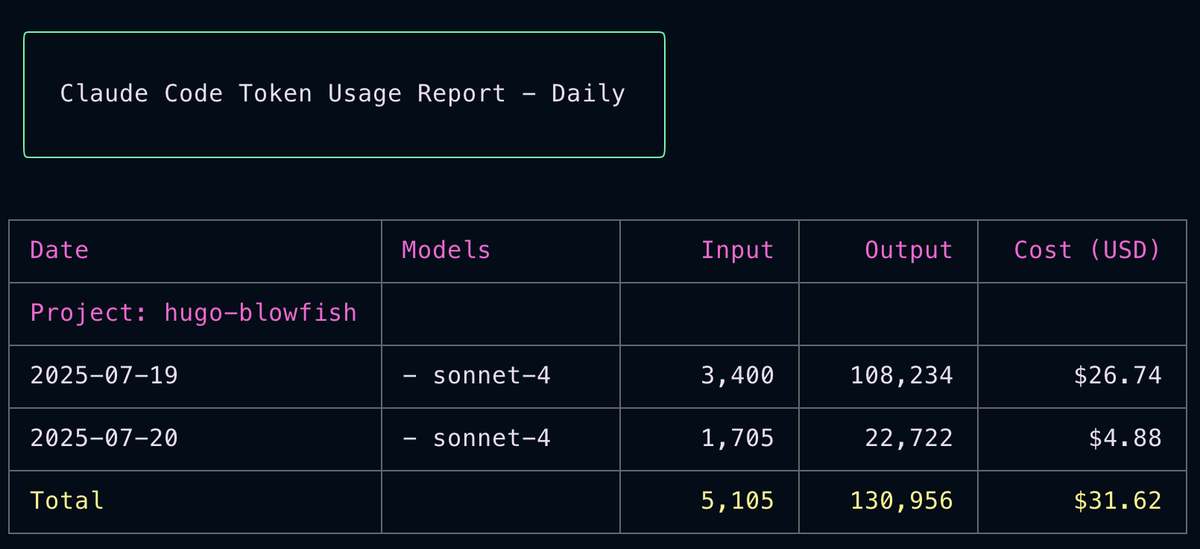
Would I use Claude Code again? Absolutely. Over two days of work, it saved me considerable time on boilerplate setup and helped identify optimizations I might have missed. While it requires active supervision and can sometimes propose overly complex solutions, the productivity gains are real. For developers comfortable with reviewing and refining AI suggestions, Claude Code is a valuable addition to the toolkit—just remember to keep one hand on the wheel.