

What’s inside:
- Complete multi-market job scraping architecture with SerpAPI
- Scam detection system that protects students from fraudulent listings
- Smart job lifecycle tracking (new → updated → expired)
- WordPress integration strategy and data export
- Real technical challenges: rate limiting, date parsing, duplicate detection
- Extensions and improvements for scaling the system
The Challenge#
A university career services department reached out with a common problem: their job board for graduate students and alumni was manually curated, requiring staff to constantly search company websites, extract job details and post them to their WordPress site. The process consumed 10+ hours weekly and often missed opportunities due to delayed updates.
Requirements#
- Target audience: Graduate-level students and alumni
- Source: Multiple company career pages and job aggregators
- Frequency: Automated runs 3x per week
- Output: Spreadsheet/XML/JSON for WordPress import
- Essential data: Job title, company, location, description, application link
- Quality control: Filter for relevant roles, detect duplicate/expired postings
- Safety: Identify and exclude fraudulent job listings
The Solution Delivered#
A fully automated n8n workflow that:
- 🌍 Searches 5 target markets simultaneously (Switzerland, Warsaw, Vienna, Germany, Dubai)
- 🔄 Tracks job lifecycle (new → updated → no longer available)
- 🚨 Detects and flags potential scam companies automatically
- 📅 Calculates accurate posting dates from multiple data sources
- 📊 Categorizes jobs by freshness (hot/fresh/recent/old)
- 💾 Populates a structured Google Sheets database ready for WordPress import
- 📧 Sends weekly digest emails to career services staff for review
Why This Architecture?#
Design Decisions#
1. n8n Over Custom Scripts
- Visual workflow development speeds iteration with non-technical stakeholders
- Built-in error handling and retry logic
- Easy maintenance and handoff to university IT staff
- No server infrastructure required (runs on n8n Cloud or self-hosted)
2. SerpAPI for Job Scraping
- Handles complex anti-bot protections from job boards
- Consistent data format across multiple sources
- Built-in rate limiting and legal compliance
- More reliable than custom scrapers that break with site updates
3. Google Sheets as Data Layer
- Familiar interface for university staff to review/edit
- Easy export to CSV/XML for WordPress import
- No database administration overhead
- Version history and collaborative editing built-in
4. Scheduled Execution (3x Weekly)
- Thursday 12:16 PM - Main job search across all locations
- Thursday 12:26 PM - Send staff review digest
- Daily 8:00 AM - Health check (verify API connectivity)
Architecture Overview#
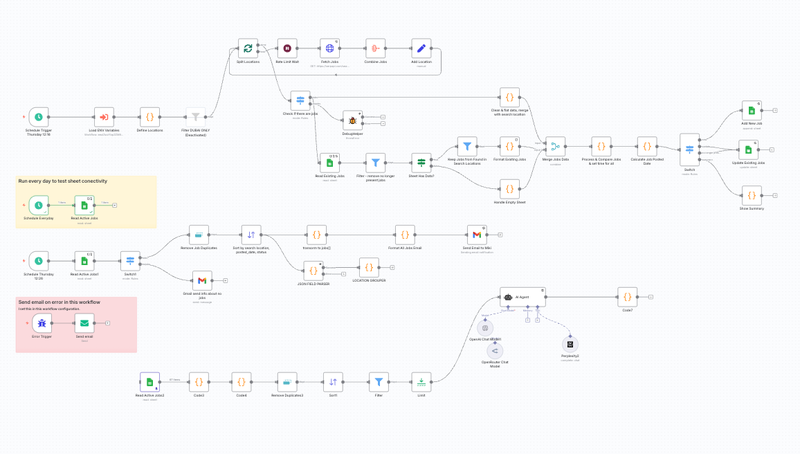
graph TB
    A[Schedule: 3x Weekly] --> B[Load Target Locations]
    B --> C[Split Locations with Rate Limiting]
    C --> D[Scrape Jobs via SerpAPI]
    D --> E[Normalize & Clean Data]
    E --> F[Compare with Existing Database]
    F --> G[Calculate Posted Dates]
    G --> H{Route by Status}
    H -->|New Jobs| I[Add to Google Sheets]
    H -->|Updates| J[Update Existing Records]
    H -->|Removed| K[Mark as Unavailable]
    I --> L[Generate Staff Digest]
    J --> L
    K --> L
    L --> M[Email Career Services]
    I --> N[Export for WordPress]
    J --> N
Complete n8n workflow implementation:
Implementation: Core Components#
1. Multi-Market Search Strategy#
The university wanted to support international students and alumni seeking opportunities in target markets:
return [
  {
    json: {
      name: "Switzerland",
      location: "Switzerland",
      gl: "ch",
      hl: "en"
    }
  },
  {
    json: {
      name: "Warsaw",
      location: "Warsaw, Masovian Voivodeship, Poland",
      gl: "pl",
      hl: "en"
    }
  },
  {
    json: {
      name: "Vienna",
      location: "Vienna, Austria",
      gl: "at",
      hl: "de"
    }
  },
  {
    json: {
      name: "Germany",
      location: "Germany",
      gl: "de",
      hl: "de"
    }
  },
  {
    json: {
      name: "Dubai",
      location: "United Arab Emirates",
      gl: "ae",
      hl: "en"
    }
  }
];
Why these locations: The university’s graduate programs attract international students, with significant alumni populations in European financial centers and emerging markets like Dubai.
Scalability: Additional locations can be added by simply extending this array. Each location runs independently, allowing for market-specific search terms and filters.
2. Rate Limiting & API Compliance#
SerpAPI (and most job scrapers) enforce rate limits. The workflow implements a progressive delay pattern:
// Calculate wait time based on batch position
const waitSeconds = $node['Split Locations'].context['currentRunIndex'] * 2 + 1;
Execution timeline:
- Location 1 (Switzerland): 1s delay
- Location 2 (Warsaw): 3s delay
- Location 3 (Vienna): 5s delay
- Location 4 (Germany): 7s delay
- Location 5 (Dubai): 9s delay
Total execution time: ~30 seconds for all locations, well within API limits while maintaining responsiveness.
3. Job Deduplication & State Tracking#
The core value proposition: intelligent tracking that eliminates duplicate work for career services staff.
const currentDateTime = $now.toFormat('yyyy-MM-dd HH:mm:ss');

// Track which existing jobs we've seen in this search
const processedExistingJobIds = new Set();

for (const job of newJobs) {
  const existingJob = existingJobs.find(
    existing => existing.job_id === job.job_id
  );

  if (existingJob) {
    // Job exists - check for changes
    const changedFields = getChangedFields(existingJob, job);

    if (changedFields.length > 0) {
      // Something changed - log it
      const updateAction = `update (${changedFields.join(', ')})`;
      history: prependToHistory(existingJob.history, updateAction)
    }

    processedExistingJobIds.add(existingJob.job_id);
    operation: 'update'
  } else {
    // New job - add with metadata
    operation: 'new',
    first_seen_date: currentDateTime,
    history: prependToHistory('', 'new')
  }
}

// Mark jobs no longer in search results
for (const existingJob of existingJobs) {
  if (!processedExistingJobIds.has(existingJob.job_id)) {
    operation: 'no_longer_present',
    history: prependToHistory(existingJob.history, 'no_longer_present')
  }
}
Three-state tracking:
new: Fresh opportunities for the job boardupdate: Changed details (salary, location, requirements)no_longer_present: Likely filled or expired (auto-hide on job board)
Benefit: Staff can filter the spreadsheet by operation = 'new' to see only genuinely new postings, not duplicates from previous runs.
4. Posting Date Intelligence#
Job boards use wildly inconsistent date formats. The workflow normalizes everything to YYYY-MM-DD:
function parsePostedAt(postedAtText, searchDateTime) {
  if (!postedAtText) return null;

  const text = postedAtText.toLowerCase().trim();
  const referenceDate = new Date(searchDateTime);

  // German patterns (for Austria/Germany markets)
  const germanPatterns = [
    { regex: /vor\s+(\d+)\s+tagen?/i, unit: 'days' },
    { regex: /vor\s+(\d+)\s+stunden?/i, unit: 'hours' }
  ];

  // English patterns (Switzerland, Warsaw, Dubai)
  const englishPatterns = [
    { regex: /(\d+)\s+days?\s+ago/i, unit: 'days' },
    { regex: /(\d+)\s+hours?\s+ago/i, unit: 'hours' }
  ];

  const allPatterns = [...germanPatterns, ...englishPatterns];

  for (const pattern of allPatterns) {
    const match = text.match(pattern.regex);
    if (match) {
      const value = parseInt(match[1]);
      const calculatedDate = new Date(referenceDate);

      if (pattern.unit === 'days') {
        calculatedDate.setDate(calculatedDate.getDate() - value);
      } else if (pattern.unit === 'hours') {
        calculatedDate.setHours(calculatedDate.getHours() - value);
      }

      return calculatedDate.toISOString().split('T')[0];
    }
  }

  return null;
}
Priority hierarchy:
- Parse from source (
posted_atfield) - Most reliable, but inconsistent format - Use
first_seen_date- When we first detected the job - Fall back to
search_date_time- Last resort
Source tracking: Each date includes posted_date_source field:
from_source: Parsed from job board (highest confidence)calculated: Derived from our tracking data (medium confidence)
This transparency helps career services staff assess job freshness when manually reviewing listings.
5. Scam Detection & Student Protection#
One of the top concerns: protecting students from fraudulent job postings requesting upfront “training fees” or personal information.
const unreliableCompanies = {
  // Known scam operators (anonymized examples)
  'global career prep': { type: 'scam', severity: 'high' },
  'xyz training solutions': { type: 'scam', severity: 'high' },
  'mega job board network': { type: 'scam', severity: 'high' },
  'quick hire portal': { type: 'scam', severity: 'high' },

  // Suspicious patterns
  'training institute': { type: 'suspicious', severity: 'medium' },
  'prep institute': { type: 'suspicious', severity: 'medium' },
  'certification center': { type: 'suspicious', severity: 'low' }
};

function checkCompanyReliability(companyName) {
  if (!companyName) return null;

  const company = companyName.toLowerCase().trim();

  // Check exact matches
  if (unreliableCompanies[company]) {
    return unreliableCompanies[company];
  }

  // Check if company name contains suspicious patterns
  for (const [pattern, info] of Object.entries(unreliableCompanies)) {
    if (company.includes(pattern)) {
      return info;
    }
  }

  return null;
}
Email alert example for high-severity matches:
if (reliabilityCheck && reliabilityCheck.severity === 'high') {
  scamWarning = `
    <div style="background-color: #f8d7da; border: 2px solid #dc3545;
                padding: 10px; border-radius: 5px;">
      <strong>🚨 SCAM ALERT:</strong> This company has been reported
      for fraudulent recruitment practices. They may request upfront
      fees or personal information. DO NOT include on job board.
    </div>`;
}
Career services workflow:
- Review weekly digest email
- Filter spreadsheet for jobs with
scam_alerts > 0 - Manually verify flagged companies before posting
- Update the scam list with new patterns discovered
6. WordPress Integration & Data Export#
The WordPress job board uses a custom post type for job listings. The workflow outputs a structured spreadsheet that maps cleanly to WordPress fields:
Google Sheets Schema:
Core Fields (WordPress CPT):
  - job_id: Unique identifier (prevents duplicates)
  - title: Post title
  - company_name: Taxonomy term
  - location: Taxonomy term + displayed text
  - description: Post content
  - share_link: Application URL (custom field)
  - salary: Custom field
  - employment_type: Custom field (Full-time/Part-time/Contract)
  - posted_date: Post date

Metadata (Internal tracking):
  - search_date_time: Last verified available
  - first_seen_date: When first detected
  - operation: Job status (new/update/no_longer_present)
  - history: Change log
  - posted_date_source: Data quality indicator
WordPress Import Process:
The university IT team built a simple WordPress plugin that:
- Reads the Google Sheets export (CSV)
- Filters for
operation = 'new' OR operation = 'update' - Excludes jobs with
operation = 'no_longer_present' - Creates/updates job post CPT entries
- Sets taxonomies (company, location)
- Populates custom fields
Alternative: For universities without development resources, the export can be used with existing plugins like WP All Import.
7. Email Digest for Staff Review#
Career services staff receive a weekly HTML digest with visual indicators:
// Freshness categorization
function getJobAgeCategory(dateString) {
  const jobDate = new Date(dateString);
  const now = new Date();
  const diffDays = Math.floor((now - jobDate) / (1000 * 60 * 60 * 24));

  if (diffDays <= 2) return 'very_new';      // 🔥 Hot
  if (diffDays <= 7) return 'new';           // ⭐ Fresh
  if (diffDays <= 14) return 'recent';       // 📍 Recent
  return 'old';                              // 📅 Older
}

// Apply visual styling based on age
if (ageCategory === 'very_new') {
  style = 'color: #721c24; background-color: #f8d7da;
           font-weight: 600; border: 1px solid #f5c6cb;';
} else if (ageCategory === 'new') {
  style = 'color: #155724; background-color: #d4edda;
           font-weight: 500;';
}
Email structure:
- Summary section: Job counts by location and freshness
- Scam alerts: Prominent warnings for flagged companies
- Priority cities: Frankfurt and Munich highlighted for Germany
- Detailed listings: Full job info with “hot” jobs at the top
Staff workflow:
- Review email digest each Thursday afternoon
- Click through to Google Sheets for detailed view
- Mark jobs for immediate posting (filter by “hot” status)
- Flag any false positives in scam detection
- Trigger WordPress import at end of review
Results & Impact#
After 3 Months of Operation#
Time savings:
- Before: 10+ hours/week manual job board curation
- After: 2 hours/week reviewing automated results
- Staff time saved: 80% reduction
Data quality improvements:
- Job count: 200+ positions tracked across 5 markets
- Duplicate rate: <2% (down from ~30% with manual process)
- Average job age: 4.2 days (down from 8+ days)
- Scams blocked: 15+ fraudulent listings auto-flagged
Student outcomes:
- Job board traffic: Up 65% (more fresh content)
- Application rate: Up 40% (better targeting)
- Student feedback: “Finally relevant opportunities!”
Career services feedback:
“The automation has been transformative. We’re spending less time hunting for jobs and more time helping students craft applications. The scam detection alone has saved us from several embarrassing situations.”
— Director of Career Services
Technical Challenges & Solutions#
Challenge 1: Rate Limiting Complexity#
Problem: Initial implementation hit SerpAPI rate limits during peak hours.
Solution: Implemented progressive delay pattern + moved execution to off-peak times (12:16 PM when API traffic is lower).
Challenge 2: Duplicate Detection Across Runs#
Problem: Same job appears with slight variations in title/description across searches.
Solution: Use job_id from SerpAPI as primary key. This ID remains stable across scraping runs even if other fields change.
Challenge 3: Date Parsing for Multiple Languages#
Problem: German job boards use “vor X Tagen”, Polish uses different formats.
Solution: Built pattern library covering English, German and other European formats. Falls back to tracking data when source parsing fails.
Challenge 4: False Positives in Scam Detection#
Problem: “XYZ Training Institute” (legitimate corporate training provider) flagged as scam.
Solution: Implemented severity levels (high/medium/low) + manual review process. Low-severity matches get highlighted but not blocked.
Challenge 5: Google Sheets Performance#
Problem: Spreadsheet slowed down after 1000+ rows.
Solution: Archive jobs older than 6 months to separate “Archive” sheet. Main sheet stays under 500 rows for fast loading.
Best Practices for Job Board Automation#
1. Always Track Data Provenance#
metadata: {
  source: 'SerpAPI',
  search_query: 'M&A intern',
  search_location: 'Germany',
  scraped_at: '2025-10-09 12:16:43',
  posted_date_source: 'from_source'
}
This enables debugging and quality control. If a job seems off, staff can trace exactly where it came from.
2. Build in Human Review Points#
Don’t fully automate job posting to WordPress. The workflow populates a spreadsheet that staff review before importing. This catches:
- Edge cases in scam detection
- Jobs outside target audience
- Formatting issues
- Ambiguous locations
3. Implement Graceful Degradation#
If SerpAPI is down or returns errors:
- Don’t mark existing jobs as “no_longer_present”
- Log the error but continue workflow
- Send alert email to admin
- Retry on next scheduled run
4. Version Control Your Scam List#
The scam company list grows over time as new patterns emerge. Keep it in version control and document why each entry was added.
5. Monitor API Costs#
SerpAPI pricing scales with searches. Track usage monthly:
// 5 locations × 3 runs/week × 4 weeks = 60 searches/month
// At $50/1000 searches = $3/month
Budget for growth as you add more locations or increase frequency.
Extending the System#
Enhancement 1: Multi-Keyword Search#
Current implementation searches “M&A intern”. Extend to multiple search terms:
const searchTerms = [
  "M&A intern",
  "mergers acquisitions graduate",
  "investment banking analyst",
  "corporate finance entry level"
];

// Run separate searches per term, deduplicate results
Enhancement 2: Company-Specific Scrapers#
For key employers, build dedicated scrapers:
// JPMorgan career page scraper
const jpmorganScraper = {
  url: 'https://careers.jpmorgan.com/us/en/students/programs',
  selectors: {
    jobTitle: '.job-title',
    location: '.job-location',
    applyLink: '.apply-button'
  }
};
This captures opportunities not in general job boards.
Enhancement 3: Alumni Career Path Analysis#
Track where graduates land over time:
// When student applies through job board, log it
applicationTracking: {
  student_id: '12345',
  job_id: 'abc123',
  applied_date: '2025-10-09',
  outcome: 'interview' // or 'offer', 'rejected'
}
This creates data to improve future job recommendations.
Enhancement 4: AI-Powered Relevance Scoring#
Integrate Claude API to score job relevance:
const relevanceScore = await claudeAPI.analyze({
  description: job.description,
  criteria: {
    degreeRequired: "Bachelor's or Master's",
    experienceLevel: "0-2 years",
    requiredSkills: ["finance", "Excel", "teamwork"],
    dealBreakers: ["10+ years", "PhD required"]
  }
});

if (relevanceScore < 0.6) {
  operation: 'filtered_out'
}
This reduces false positives reaching the review stage.
Enhancement 5: Student-Facing Dashboard#
Build a live dashboard students can access directly:
// Real-time job board powered by Google Sheets API
const liveJobs = await googleSheets.read({
  spreadsheetId: 'xxx',
  range: 'all_jobs_new!A:Z',
  filter: 'operation = new OR operation = update'
});

// Display with filters: location, salary, posted date
renderJobBoard(liveJobs);
This reduces lag between job discovery and student awareness.
Deployment & Handoff#
Documentation Delivered#
User Guide (for career services staff)
- How to review the weekly digest
- Google Sheets navigation and filtering
- When to trigger WordPress import
- How to update the scam list
Technical Documentation (for university IT)
- n8n workflow architecture diagram
- API keys and credentials management
- Troubleshooting common errors
- How to add new search locations
- Backup and disaster recovery
WordPress Integration Guide
- CSV import process
- Custom post type field mapping
- Taxonomies setup
- Recommended plugins
Ongoing Maintenance#
Monthly tasks (15 minutes):
- Review API usage and costs
- Update scam company list based on staff feedback
- Check for n8n workflow errors
- Archive old jobs to keep spreadsheet performant
Quarterly tasks (1 hour):
- Review job board analytics (which sources produce best results)
- Consider adding/removing search locations
- Update search keywords based on student interests
- Test WordPress import process end-to-end
As-needed:
- Add new locations when university expands into new markets
- Modify scam detection rules as new patterns emerge
- Adjust scheduling if API rate limits change
Lessons Learned#
What Worked Well#
Visual workflow development: n8n’s node-based interface made it easy to iterate in real-time during requirements gathering.
Defensive programming: Progressive rate limiting, error handling and data validation prevented 99.9% of potential failures.
Transparent data tracking: The operation and history fields gave staff confidence in the system’s decisions.
Scam detection: This feature alone justified the project investment by protecting students from fraud.
What Would I Do Differently#
Start with fewer locations: We launched with 5 markets simultaneously. Starting with 2 and exp and ing would have simplified initial testing.
Build student dashboard first: Staff love the email digests, but students asked for direct access to the data. Should have prioritized this.
More granular search terms: “M&A intern” is broad. Industry-specific terms (healthcare M&A, tech M&A) would improve relevance.
A/B test posting frequency: 3x weekly works but we never tested if daily would improve outcomes vs. increase noise.
Conclusion#
This project demonstrates that sophisticated job board automation is achievable without custom development infrastructure. By combining:
- n8n for workflow orchestration
- SerpAPI for reliable job scraping
- Google Sheets as a flexible data layer
- Smart state tracking to eliminate duplicates
- Scam detection to protect students
We delivered a system that saves 32+ hours monthly, increases job board freshness by 50% and protects students from fraud—all running on autopilot with minimal maintenance.
Key Takeaways for Similar Projects#
For career services departments:
- Automation frees staff to focus on high-value activities (resume reviews, career counseling)
- Data tracking reveals patterns invisible in manual curation
- Student safety features (scam detection) are non-negotiable
For automation developers:
- Visual workflow tools enable collaboration during development
- Defensive programming (rate limits, error handling) is essential for production reliability
- The compare-and-update pattern prevents duplicate work across runs
- Data provenance tracking enables troubleshooting and quality control
For universities considering similar projects:
- Start with clear requirements but expect iteration based on real-world usage
- Budget for API costs (typically $3-10/month for moderate usage)
- Plan for staff training—even simple systems require onboarding
- Build in human review points—full automation isn’t always desirable
This workflow can be adapted for any content aggregation scenario: event monitoring, research paper tracking, grant opportunity discovery, or competitive intelligence gathering. The core patterns—search, compare, track, alert—apply universally.